
Prolog: APIs sind die Sprache moderner Software
Jede moderne Anwendung kommuniziert über APIs. Dein Frontend spricht mit dem Backend über eine REST-API, dein Backend spricht mit Datenbanken, externen Services und Microservices — alles über APIs. Eine gut designte API ist wie eine gut geschriebene Sprache: klar, konsistent und vorhersagbar. Eine schlecht designte API ist eine Quelle endloser Bugs, Frustration und technischer Schulden.
In diesem Artikel entwerfen wir eine produktionsreife REST-API von Grund auf: Architektur, Authentifizierung, Rate Limiting, Versionierung, Fehlerbehandlung und Performance-Optimierung. Alles mit konkreten Beispielen, alles umsetzbar auf deinem Linux-Server.
Kapitel 1: REST-Architektur — Der Request-Lebenszyklus
Ein HTTP-Request durchläuft mehrere Schichten, bevor er eine Antwort erzeugt. Diese Middleware-Pipeline ist das Rückgrat jeder API: Rate Limiting schützt vor Überlastung, Authentication prüft die Identität, der Router leitet an den richtigen Handler, Validation prüft die Eingabedaten, Business Logic verarbeitet die Anfrage, und die Datenbank liefert die Daten.
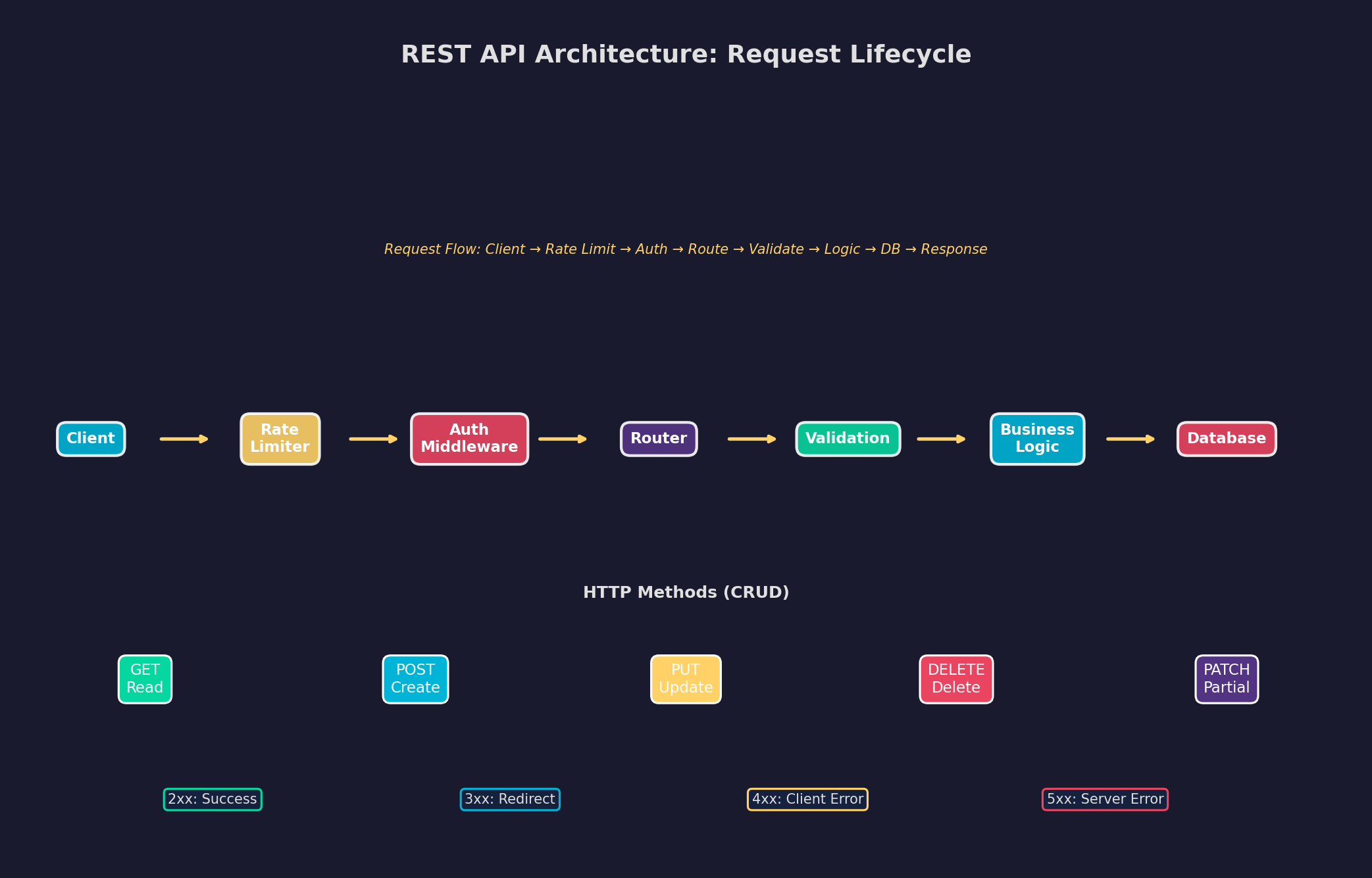
Die HTTP-Methoden sind nicht verhandelbar: GET liest Daten (idempotent, cachebar), POST erstellt neue Ressourcen (nicht idempotent), PUT ersetzt eine Ressource komplett, PATCH ändert einzelne Felder, DELETE löscht. Eine häufige Anti-Pattern: Alles über POST zu routen — das zerstört Caching, Idempotenz und die Semantik deiner API. Nutze die richtigen Methoden.
Kapitel 2: Authentifizierung — JWT und Token-basierte Sicherheit
Authentifizierung beantwortet die Frage: Wer bist du? Autorisierung beantwortet: Was darfst du? In modernen APIs dominiert JWT (JSON Web Tokens): Stateless Tokens, die Benutzerinformationen und Berechtigungen enthalten, kryptographisch signiert und zeitlich begrenzt.
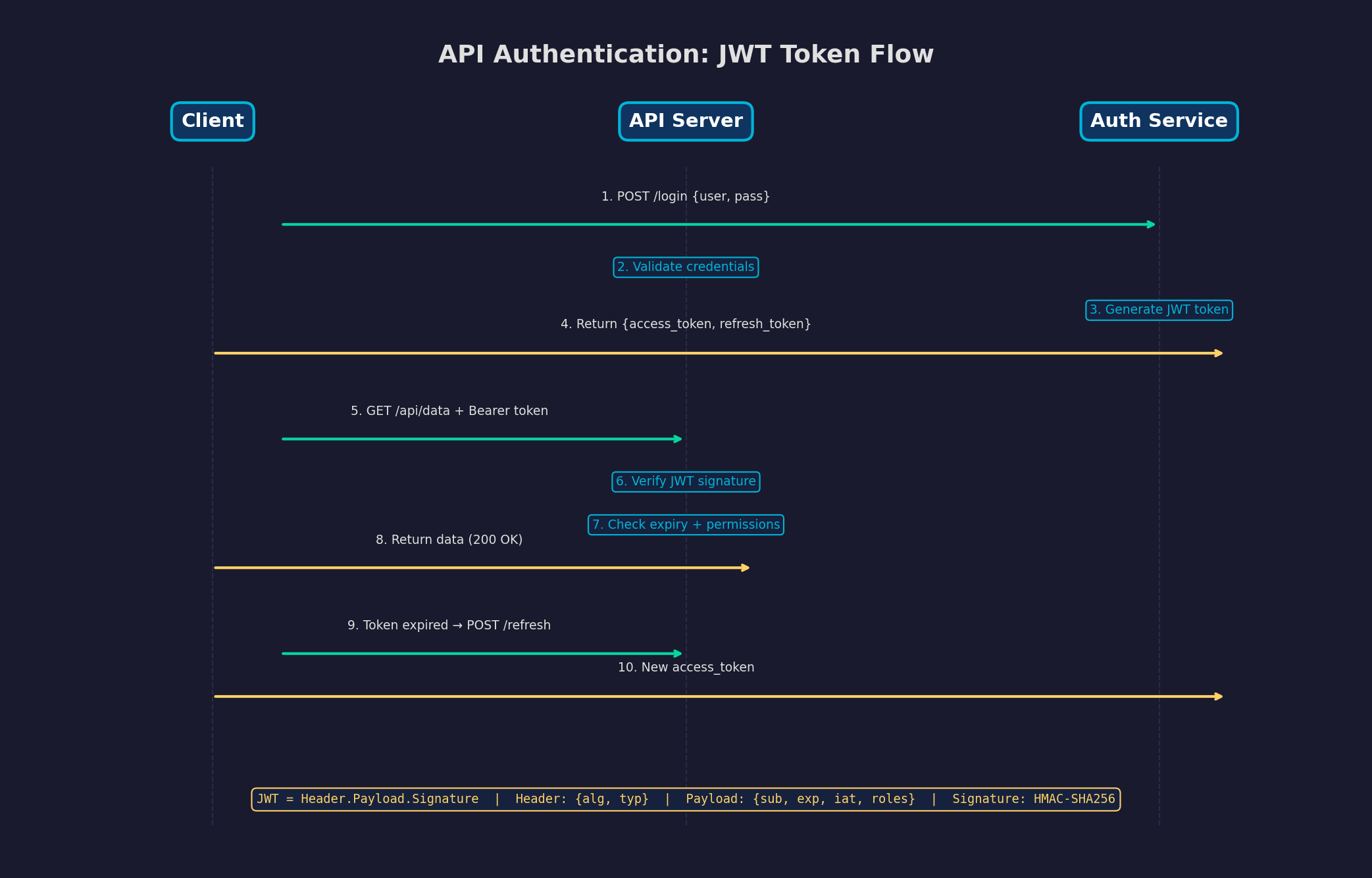
Kritische Sicherheitsaspekte: (1) Access Tokens kurz halten (15 Minuten) — bei Kompromittierung ist der Schaden begrenzt. (2) Refresh Tokens lang (7-30 Tage) — aber in der Datenbank speichern und widerrufbar machen. (3) Secrets niemals im Frontend — JWTs sind Base64-codiert, nicht verschlüsselt. Jeder kann den Payload lesen. (4) HTTPS ist Pflicht — ohne TLS kann jeder den Token abfangen. (5) Nutze httpOnly Cookies statt LocalStorage — XSS-Schutz.
Kapitel 3: Rate Limiting — Deine API vor Überlastung schützen
Ohne Rate Limiting kann ein einzelner Client deine gesamte API lahmlegen — ob durch einen Bug, einen Crawler oder einen DDoS-Angriff. Rate Limiting begrenzt die Anzahl der Requests pro Client pro Zeiteinheit und gibt bei Überschreitung einen 429 Too Many Requests zurück.
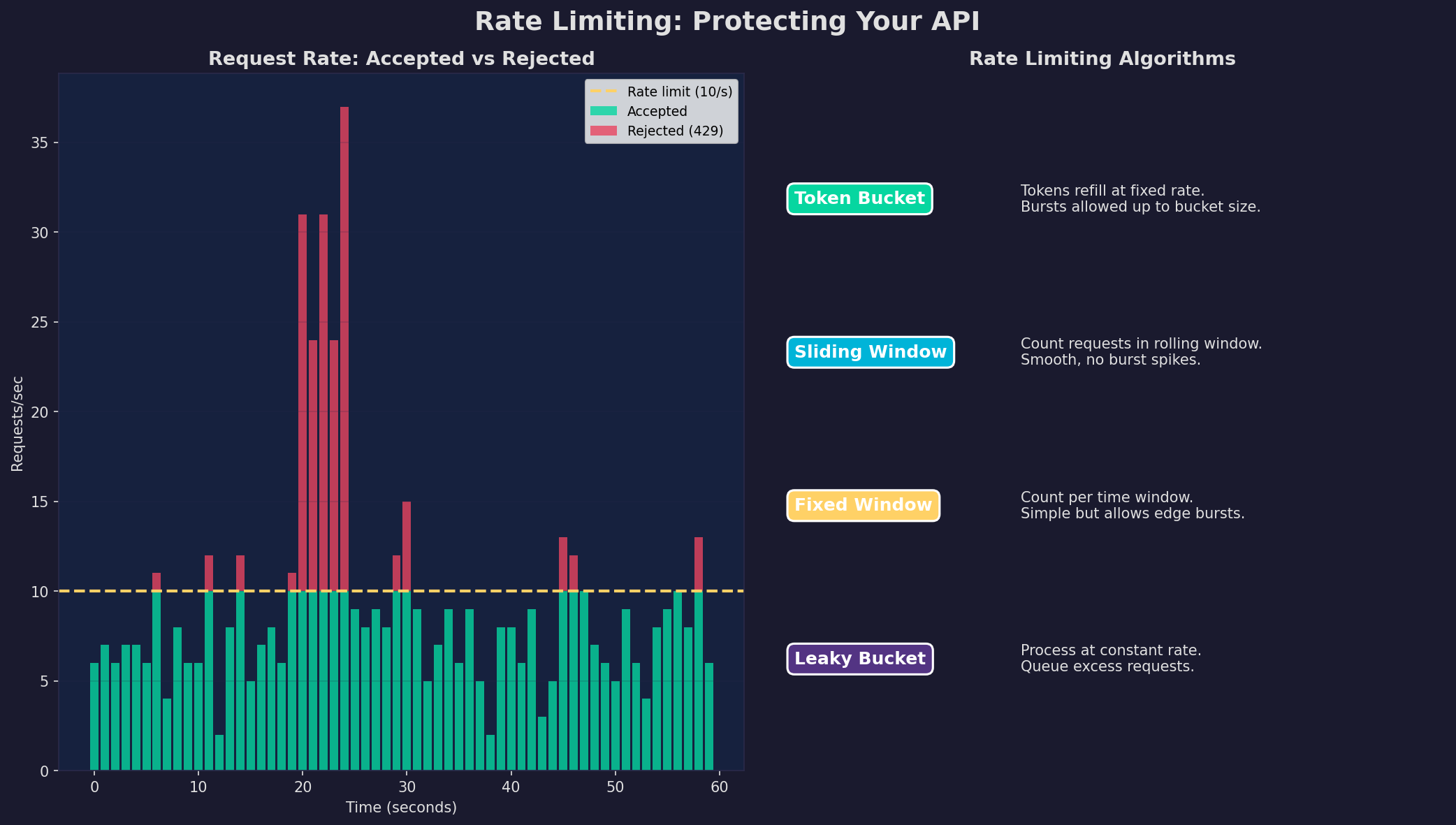
Die Implementierung: Token Bucket ist der Goldstandard — ein Bucket hat eine maximale Kapazität (z.B. 100 Tokens) und füllt sich mit einer festen Rate (z.B. 10 Tokens/Sekunde). Jeder Request verbraucht einen Token. Bursts sind erlaubt (bis zur Bucket-Größe), aber die durchschnittliche Rate bleibt begrenzt. In der HTTP-Response: X-RateLimit-Limit: 100, X-RateLimit-Remaining: 67, X-RateLimit-Reset: 1705312800.
Kapitel 4: Versionierung und Paginierung
APIs entwickeln sich weiter — aber bestehende Clients dürfen nicht brechen. API-Versionierung ermöglicht parallele Versionen: Alte Clients nutzen v1, neue Clients v2. Die Frage ist nur: Wie versionierst du? URL-Path (/api/v2/), Query-Parameter, Header oder Content Negotiation?
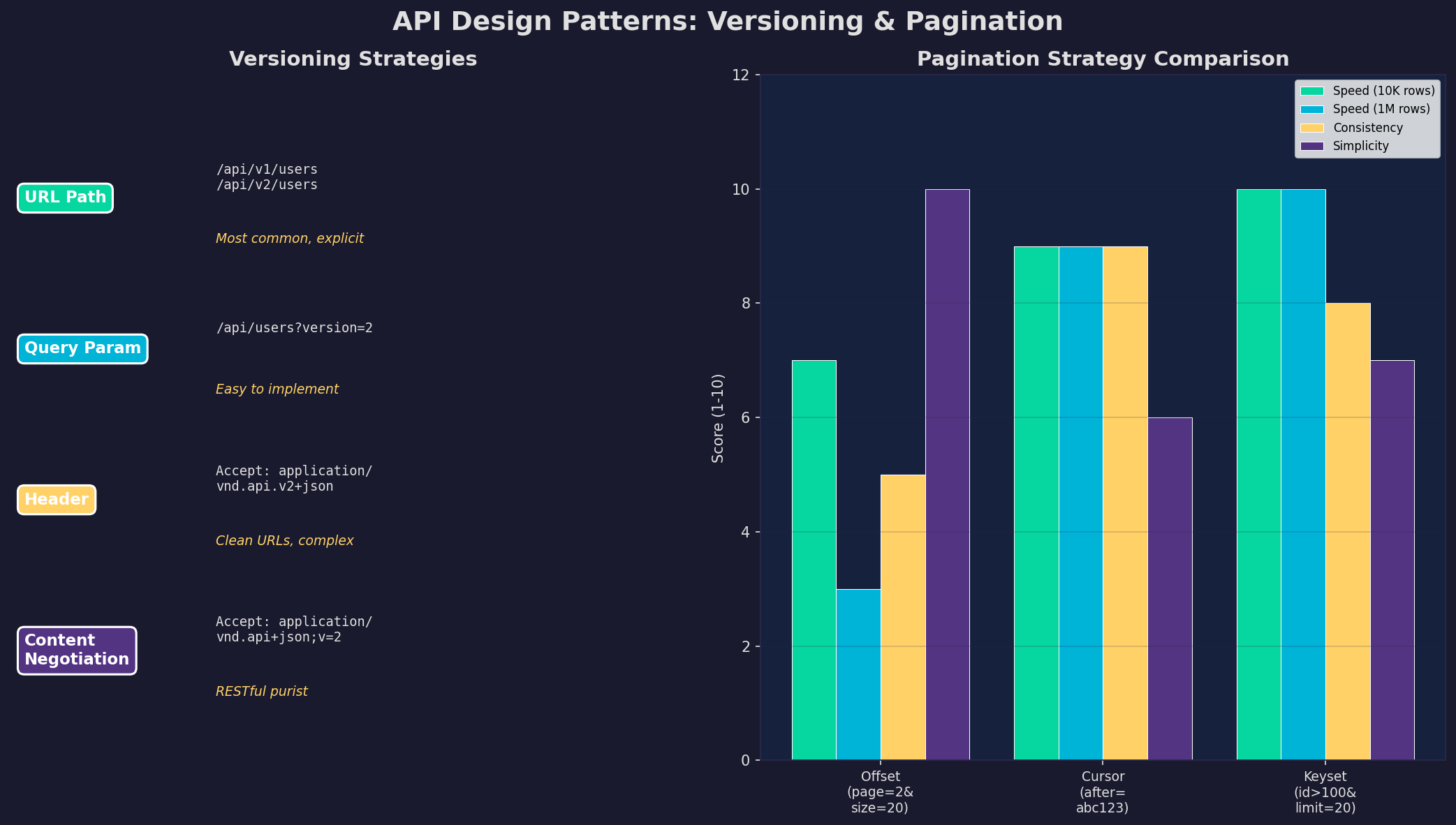
Meine Empfehlung: URL-Path-Versionierung (/api/v1/) — sie ist explizit, debugfreundlich und Cache-freundlich. Für Paginierung: Cursor-basiert für APIs mit Echtzeit-Daten (keine Duplikate bei Inserts), Offset-basiert für einfache CRUD-APIs mit wenig Daten. Keyset-Paginierung ist die performanteste (WHERE id > :last_id ORDER BY id LIMIT 20), aber erfordert einen sortierbaren, eindeutigen Key.
Kapitel 5: Fehlerbehandlung — Konsistenz ist alles
Die meisten APIs scheitern nicht an der Funktionalität, sondern an der Fehlerbehandlung. Inkonsistente Fehlermeldungen, falsche Statuscodes und fehlender Kontext machen Debugging zum Alptraum. Eine gute API hat ein standardisiertes Error-Response-Format, das maschinenlesbar und menschenverständlich ist.
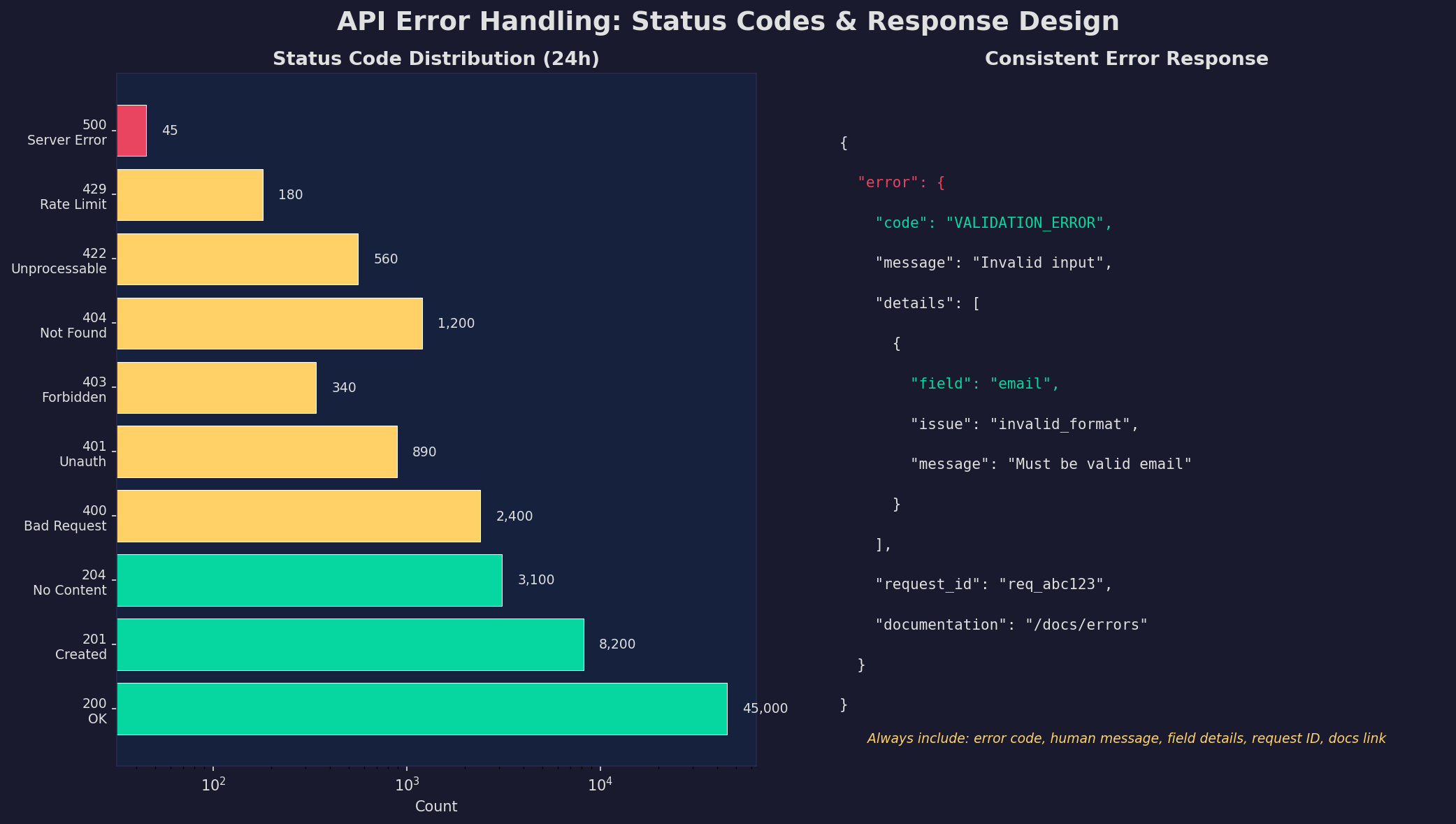
Die goldenen Regeln: (1) Nutze den richtigen Statuscode — 400 für ungültige Eingaben, 401 für fehlende Auth, 403 für fehlende Berechtigungen, 404 für nicht gefunden, 422 für semantische Fehler, 429 für Rate Limit, 500 nur für echte Server-Fehler. (2) Jede Fehlermeldung enthält einen maschinenlesbaren Code (VALIDATION_ERROR), eine menschliche Nachricht und Felddetails. (3) Jede Response enthält eine Request-ID für Log-Korrelation.
Kapitel 6: Performance — Latenz, Durchsatz und Caching
Eine langsame API ist eine tote API. Nutzer tolerieren maximal 200ms Latenz für Web-Interaktionen. Deine API muss also schnell sein — und das unter Last. Performance-Optimierung hat drei Ebenen: Response-Zeit (wie schnell antwortet ein einzelner Request?), Durchsatz (wie viele Requests/Sekunde schaffst du?) und Caching (wie oft vermeidest du unnötige Arbeit?).
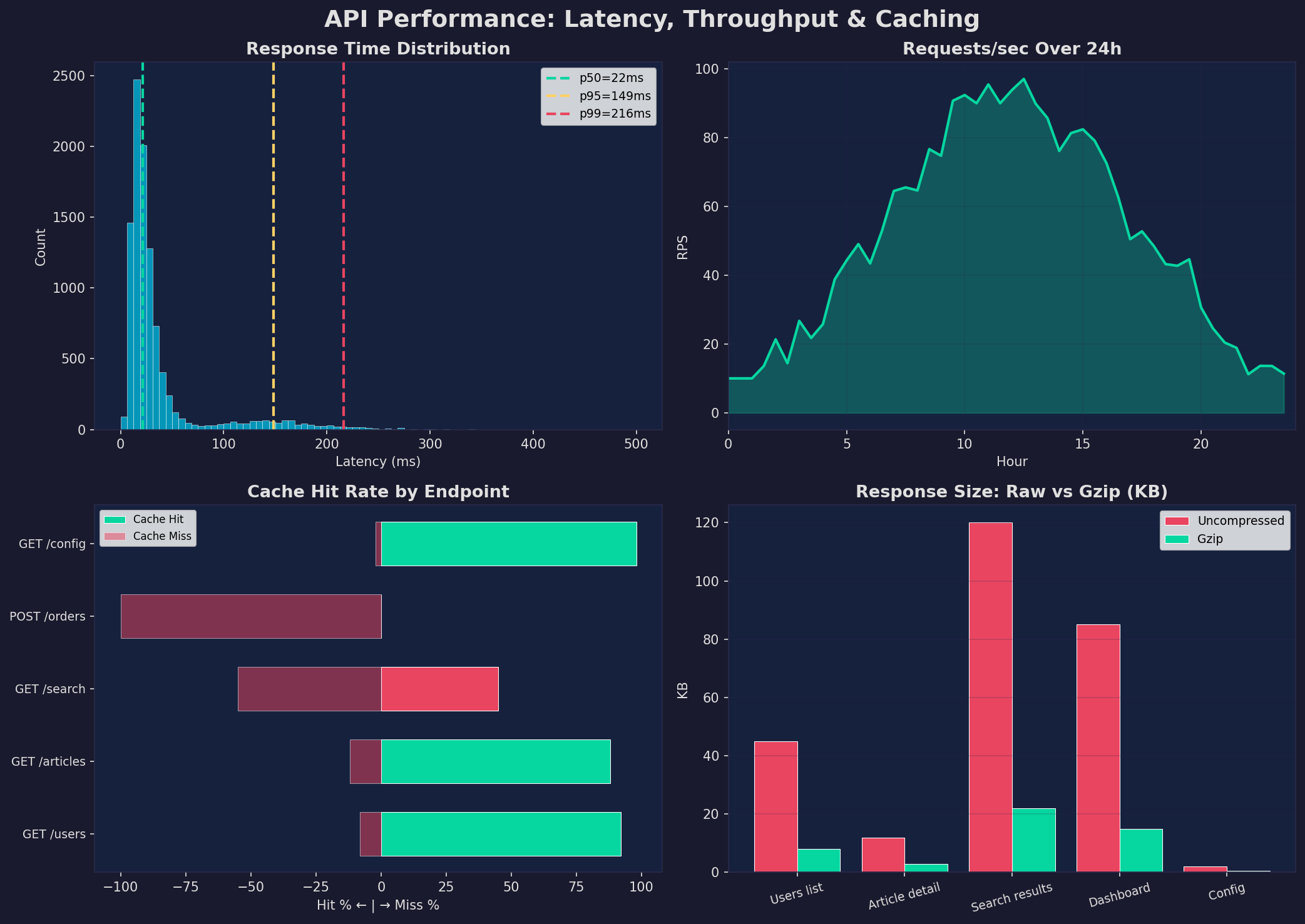
Optimierungshebel: (1) Datenbank-Queries — N+1-Queries eliminieren, Indizes nutzen, nur benötigte Felder selektieren. (2) HTTP-Caching — Cache-Control, ETag und 304 Not Modified nutzen. GET-Endpoints mit stabilen Daten können Minuten oder Stunden gecacht werden. (3) Gzip-Kompression — reduziert Response-Größe um 75-85%. (4) Connection Pooling — Datenbankverbindungen wiederverwenden statt pro Request neu aufbauen. (5) Async I/O — FastAPI/Starlette für Python, async/await für I/O-bound Operations.
Epilog: API-Design ist Produktdesign
Eine API ist ein Produkt — deine Entwickler-Kunden nutzen sie täglich. Investiere in gutes Design, klare Dokumentation (OpenAPI/Swagger), konsistente Fehlerbehandlung und vernünftige Defaults. Eine API, die schwer zu missbrauchen und leicht richtig zu nutzen ist, spart Hunderte Stunden Support und Debugging. Design for the developer experience.
Zitationen
- Fielding, R.T. (2000). Architectural Styles and the Design of Network-based Software Architectures. Doctoral dissertation, UC Irvine.
- Masse, M. (2011). REST API Design Rulebook. O'Reilly Media.
- Lauret, A. (2019). The Design of Web APIs. Manning Publications.
- IETF (2022). RFC 9110: HTTP Semantics. datatracker.ietf.org
- Jones, M. et al. (2015). RFC 7519: JSON Web Token (JWT). IETF.
Fazit
Eine gut designte REST-API folgt klaren Prinzipien: Richtige HTTP-Methoden, sichere Authentifizierung mit JWT, Rate Limiting gegen Überlastung, saubere Versionierung, konsistente Fehlerbehandlung und Performance-Optimierung durch Caching und Kompression. Jedes Kapitel ist ein eigenständiger Baustein — zusammen ergeben sie eine API, die robust, sicher und performant ist.
Dokumentation
| Parameter | Wert |
|---|---|
| Protokoll | HTTPS (TLS 1.3) |
| Authentifizierung | JWT (Access + Refresh Tokens) |
| Rate Limit | Token Bucket (100 req/min) |
| Versionierung | URL Path (/api/v1/) |
| Paginierung | Cursor-basiert (default 20) |
| Kompression | Gzip (75-85% Reduktion) |
| Latenz-Ziel | p95 < 100ms |
| Dokumentation | OpenAPI 3.1 / Swagger UI |
Prologue: APIs Are the Language of Modern Software
Every modern application communicates through APIs. Your frontend talks to the backend via a REST API, your backend talks to databases, external services, and microservices — all through APIs. A well-designed API is like a well-written language: clear, consistent, and predictable. A poorly designed API is a source of endless bugs, frustration, and technical debt.
In this article, we design a production-ready REST API from the ground up: architecture, authentication, rate limiting, versioning, error handling, and performance optimization. All with concrete examples, all implementable on your Linux server.
Chapter 1: REST Architecture — The Request Lifecycle
An HTTP request passes through multiple layers before generating a response. This middleware pipeline is the backbone of every API: Rate limiting protects against overload, authentication checks identity, the router directs to the correct handler, validation checks input data, business logic processes the request, and the database delivers the data.
HTTP methods are non-negotiable: GET reads data (idempotent, cacheable), POST creates new resources (not idempotent), PUT replaces a resource completely, PATCH modifies specific fields, DELETE removes. A common anti-pattern: Routing everything through POST — this destroys caching, idempotency, and the semantics of your API. Use the right methods.
Chapter 2: Authentication — JWT and Token-Based Security
Authentication answers the question: Who are you? Authorization answers: What are you allowed to do? In modern APIs, JWT (JSON Web Tokens) dominates: Stateless tokens that contain user information and permissions, cryptographically signed and time-limited.
Critical security aspects: (1) Keep access tokens short (15 minutes) — if compromised, damage is limited. (2) Refresh tokens long (7-30 days) — but store in the database and make them revocable. (3) Secrets never in the frontend — JWTs are Base64-encoded, not encrypted. Anyone can read the payload. (4) HTTPS is mandatory — without TLS, anyone can intercept the token. (5) Use httpOnly cookies instead of LocalStorage — XSS protection.
Chapter 3: Rate Limiting — Protecting Your API from Overload
Without rate limiting, a single client can bring down your entire API — whether through a bug, a crawler, or a DDoS attack. Rate limiting caps the number of requests per client per time unit and returns 429 Too Many Requests when exceeded.
The implementation: Token Bucket is the gold standard — a bucket has a maximum capacity (e.g., 100 tokens) and refills at a fixed rate (e.g., 10 tokens/second). Each request consumes a token. Bursts are allowed (up to bucket size), but the average rate stays capped. In the HTTP response: X-RateLimit-Limit: 100, X-RateLimit-Remaining: 67, X-RateLimit-Reset: 1705312800.
Chapter 4: Versioning and Pagination
APIs evolve — but existing clients must not break. API versioning enables parallel versions: Old clients use v1, new clients v2. The only question is: How do you version? URL path (/api/v2/), query parameter, header, or content negotiation?
My recommendation: URL path versioning (/api/v1/) — it's explicit, debug-friendly, and cache-friendly. For pagination: cursor-based for APIs with real-time data (no duplicates on inserts), offset-based for simple CRUD APIs with little data. Keyset pagination is the most performant (WHERE id > :last_id ORDER BY id LIMIT 20), but requires a sortable, unique key.
Chapter 5: Error Handling — Consistency Is Everything
Most APIs fail not at functionality but at error handling. Inconsistent error messages, wrong status codes, and missing context make debugging a nightmare. A good API has a standardized error response format that is both machine-readable and human-understandable.
The golden rules: (1) Use the right status code — 400 for invalid input, 401 for missing auth, 403 for missing permissions, 404 for not found, 422 for semantic errors, 429 for rate limit, 500 only for actual server errors. (2) Every error includes a machine-readable code (VALIDATION_ERROR), a human message, and field details. (3) Every response includes a request ID for log correlation.
Chapter 6: Performance — Latency, Throughput, and Caching
A slow API is a dead API. Users tolerate at most 200ms latency for web interactions. Your API must be fast — and under load. Performance optimization has three levels: Response time (how fast does a single request respond?), Throughput (how many requests/second can you handle?) and Caching (how often do you avoid unnecessary work?).
Optimization levers: (1) Database queries — eliminate N+1 queries, use indexes, select only needed fields. (2) HTTP caching — use Cache-Control, ETag, and 304 Not Modified. GET endpoints with stable data can be cached for minutes or hours. (3) Gzip compression — reduces response size by 75-85%. (4) Connection pooling — reuse database connections instead of creating new ones per request. (5) Async I/O — FastAPI/Starlette for Python, async/await for I/O-bound operations.
Epilogue: API Design Is Product Design
An API is a product — your developer customers use it daily. Invest in good design, clear documentation (OpenAPI/Swagger), consistent error handling, and sensible defaults. An API that's hard to misuse and easy to use correctly saves hundreds of hours of support and debugging. Design for the developer experience.
Citations
- Fielding, R.T. (2000). Architectural Styles and the Design of Network-based Software Architectures. Doctoral dissertation, UC Irvine.
- Masse, M. (2011). REST API Design Rulebook. O'Reilly Media.
- Lauret, A. (2019). The Design of Web APIs. Manning Publications.
- IETF (2022). RFC 9110: HTTP Semantics. datatracker.ietf.org
- Jones, M. et al. (2015). RFC 7519: JSON Web Token (JWT). IETF.
Conclusion
A well-designed REST API follows clear principles: Correct HTTP methods, secure authentication with JWT, rate limiting against overload, clean versioning, consistent error handling, and performance optimization through caching and compression. Each chapter is a standalone building block — together they form an API that is robust, secure, and performant.
Documentation
| Parameter | Value |
|---|---|
| Protocol | HTTPS (TLS 1.3) |
| Authentication | JWT (Access + Refresh Tokens) |
| Rate Limit | Token Bucket (100 req/min) |
| Versioning | URL Path (/api/v1/) |
| Pagination | Cursor-based (default 20) |
| Compression | Gzip (75-85% reduction) |
| Latency Target | p95 < 100ms |
| Documentation | OpenAPI 3.1 / Swagger UI |